It’s been a crazy couple months since I posted last. My wife and I both have new jobs, we moved, and we’re trying to figure out how to go through the massive amount of stuff we have in the garage into the house.
We’ve got a lot of furniture.
It’s crazy, but it’s overall good. Trying to get the indoor cats used to the outdoor cat (now indoor cat) and the new digs is a process, though, and it’s going to take longer than I particularly want it to. But them’s the breaks. Cats, amirite?
That aside, as you can see by the sidebar, my reading has continued, though my video games have not. I should start up the ol’ Witcher games again since there’s a re-release a-comin’ on those. Maybe I’ll get to it, likely I won’t.
The one thing I did almost right away at the new house was set up the workout equipment. It’s in a room that I call the Dungeon or the Torture Room that holds the home gym and the rowing machine. I think it’s fitting. On the plus side, I’ve used it regularly this week, so hoping I can get back into the swing of things. I am up about 7 pounds in the last few months (since I stopped working at Duluth, really, so 3 months to the day on Monday) and the workout will help me get a handle on that again.
Also, the amount of junk food eaten while we were moving was simply astounding. We’re on a pizza-fast for the next couple of weeks.
When did Notepad become so flipping slow and awful? I mean, I know it was when MS decided to screw around with it and integrate a lot of unasked for updates and integrations, but man. I didn’t realize how bad it got until I switched over to Notepad++ this morning.
It’s really night and day difference for speed. I was having to click like four times when I wanted to get the cursor into my notepad document and then it was slow where my edits and cut/pastes were like four seconds late.
That may not seem like much, but in a work flow with a dozen cut/pastes per minute, it is significantly slow.
Also, the fact that kept opening like the last opened text document with the one I wanted open was really stupidly annoying.
When dealing with voice assistants, I got sick of Amazon shilling everything under the sun on the Alexa device that I’ve used, quite literally, since they launched the service. It was one of the original Echo devices, the tall tower one with a speaker that was…*chef’s kiss* Really an outstanding device for a little over a decade.
This last Christmas, my family got me a couple of voice assistants and a Raspberry Pi 5 (because I begged for them (tbh I put them on my list (tbh my wife was probably sick of me complaining about the alexa))). I asked for them because we have added quite a few smart plugs and a few smart lights in the house over the last few years, and we’ve really gotten used to using Alexa to set alarms and timers and to play some Pandora stations and some Christmas music. The voice assistants and the Raspberry Pi 5 were to replace the Amazon Echo and the Echo Dot (the Echo was in the house, the dot in my office).
It’s been a really interesting journey here, adding devices to the network, getting it to interface with my TrueNAS storage (and my music), getting it to work with Pandora (thank you kind Music Assistant programmers for the nightly releases that integrated it), and getting all the plugs moved over to open source to avoid having to log in through half a dozen manufacturer sites/APIs/Phone Apps for it to work. It’s been fun and educational. If I had recorded myself it’d be some edutainment, I tell you what.
That aside, though, I finally cracked the last bit of a hassle that I’ve had for the previous few months. My job ended due to budget cuts a week ago last Friday, and so I spent some time finally getting this hassle taken care of.
Y’see, I love the concept of LLMs. I like the back and forth one can have with them, the troubleshooting nature of them, and the way they operate. I REALLY hate the fact that giant companies like Google, Microsoft, OpenAI, Anthropic, etc. are forcing them down everyone’s throats while stealing your personal data from the chats. So I looked into throwing a local LLM on my TrueNAS server.
Suffice to say, it worked pretty well. The models were small, but that’s ok, I don’t need complicated stuff. A basic coding model to flesh out ideas, and a chatty model that will work with Home Assistant were what I wanted. I got them to work on my NAS using my ancient 1080 GTX gpu (with 8gb of RAM!), and they did what I wanted…on the NAS.
Hooking them into the Home Assistant system, though, was a pain point. I wanted them to connect, run the models, contexts, and information on my GPU, and spit out whatever response necessary via the speaker hooked into my voice assistant. That’s where there were issues from almost the get-go.
Ollama as a community app on TrueNAS Scale defaults to the most recent CUDA drivers (something like 570 something or another). 550 drivers, though, were the last ones to work with my 1080. So that was a problem, which interestingly enough, Open WebUI skipped over and used the GPU specifically with the Ollama installed models. I tried a few different things suggested by both Gemini and ChatGPT (because I figured why not get their help to replace themselves), and to no one’s great surprise, they sent me down a few rabbit holes where it didn’t work.
The biggest one was with ChatGPT…they had me make a custom Ollama docker image telling me that this would allow me to use an old version that used the driver. The problem, of course, was that AFTER jumping through that hoop, and then doing a bunch of tests that they assured me would work without a problem, they then told me it was impossible to actually use an older version that used that driver and that I was an utter fool for even thinking that would work, offering such clarifying statements as “I apologize, I didn’t clarify enough”…honestly, it was one step away from Obi Wan’s “from a certain point of view…”
Then I started up the ol’ Gemini, and they gave me the solution to pin to an older version of Ollama. That got installed without a problem with the LLM assuring me without a doubt that each step would fix the issue of using 100% CPU by Ollama. Needless to say eventually they too were like “Hey! Y’know what would fix this? Going back to the official Ollama app!”
To no one’s surprise, it didn’t work.
The LLMs finally admitted there was nothing wrong with my GPU (after telling me repeatedly the GPU was a problem and so was Ollama, and me just as often repeatedly telling them that Open WebUI used the GPU), and so sent me to the Home Assistant settings. None of them worked. They sent me to an eXtended OpenAI conversation community app on Home Assistant. It didn’t work.
They sent me to the official OpenAI conversation app…it didn’t work because I don’t have an API key for ChatGPT and there was no way to point it to my local LLM. They finally said, y’know what, the official Ollama home assistant app should work! This after me repeatedly telling them it processed everything on the CPU.
Finally I asked if there was a way we could just use the Open WebUI app on my server to process the GPU calls…and then things started working thankfully. Now the LLM uses the GPU instead of the CPU, the response time is almost instantaneously compared to the CPU processing.
I’m, in the words of the British, chuffed.
Of course, this would have worked flawlessly if I had a newer GPU, but that’ll come in time.
Any time an app starts up (without permission, and without being in the startup settings) and then tries to use windows notification to advertise how it’s the browser that should be used, it gets uninstalled.
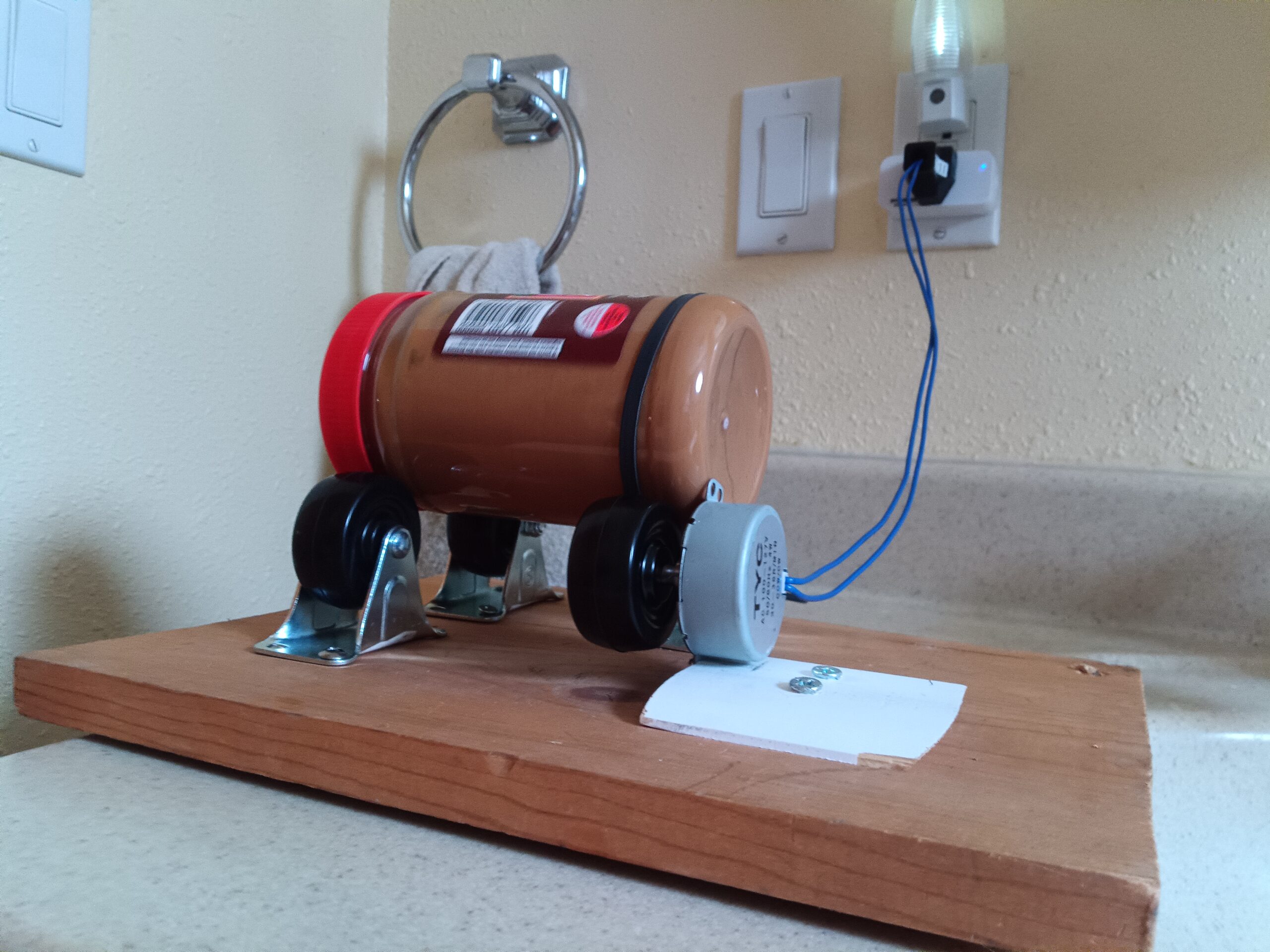
So one of the greatest things I’ve done with home automation (originally on Alexa, and now that I’ve moved completely to Home Assistant) is a peanut butter spinner.
We made the move to organic peanut butter a few years back, specifically Kirkland Select organic. It’s delicious, with just the right of salt. The only downside, which anyone who uses organic nut butter knows, is that the oil separates and necessitates stirring.
It’s messy, a pain in the butt, and you always end up with rock hard concrete at the bottom of the jar when you get there, because the upper 2/3rds of the jar had all of the poorly mixed oil.
Well, I found a nut butter spinner on Amazon (for like $40!!!), and I thought to myself, self, y’know you could probably build something better that doesn’t run on batteries and that would reliably shut off. And I responded to me and said “Self, you’re right.” So for about $13 and an extra smart plug, I made my own peanut butter spinner. It runs for 90 minutes and then stops.
The jar stays mixed for about 2 months in the fridge, though we go through it before it would start to separate.
Best part? No spilled oil all over the place, messy implements, or shortened patience. 10/10 would recommend.
Last year was a pretty good setup for games, and I definitely read more books than I have in quite some time. 2026 is shaping up pretty good for both, and I’ve updated the sidebar for that info.
Video Games Played in 2025
God of War 3 God of War 2 (PS2) God of War: Ghost of Sparta God of War (PS2) God of War: Chains of Olympus Fallout New Vegas Vambrace: Cold Souls Terraforming Mars Golden Sun (gba) Legend of Zelda: Tears of the Kingdom Borderlands 3 Doom Eternal Doom (2016) Legend of Grimrock 2 Legend of Grimrock 1 Eye of the Beholder III BattleTech Eye of the Beholder II Eye of the Beholder Vaporum
Books Read in 2025
Dragonlance: Amber and Blood Dragonlance: Amber and Iron Dragonlance: Amber and Ashes Dragonlance: Dragons of a Vanished Moon Dragonlance: Dragons of a Lost Star Dragonlance: Dragons of Fallen Sun Dragonlance: Dragons of Summer Flame Ender’s Game The Forever War BattleTech Legends: Heir to the Dragon BattleTech Legends: BattleTech Legends: Wolves on the Border BattleTech Legends: The Sword and the Dagger BattleTech Legends: Warrior: Coupé BattleTech Legends: Warrior: Riposte BattleTech Legends: Warrior: En Garde After the Fall, Before the Fall, During the Fall Dragonlance: Time of the Twins Dragonlance: War of the Twins Dragonlance Test of the Twins Dragonlance: Dragons of Spring Dawning Dragonlance: Dragons of Winter Night Stormlight Archive 5: Wind and Truth Stormlight Archive 4: Rhythm of War Stormlight Archive 3: Oathbringer Stormlight Archive 2: Words of Radiance
So I know it’s been quite some time since I posted. What can I say? As you can see on the sidebar/below the post (if you’re on mobile), I’ve been playing quite a number of video games (finally beating Zelda Tears of the Kingdom) as well as reading a few books now ‘n again.
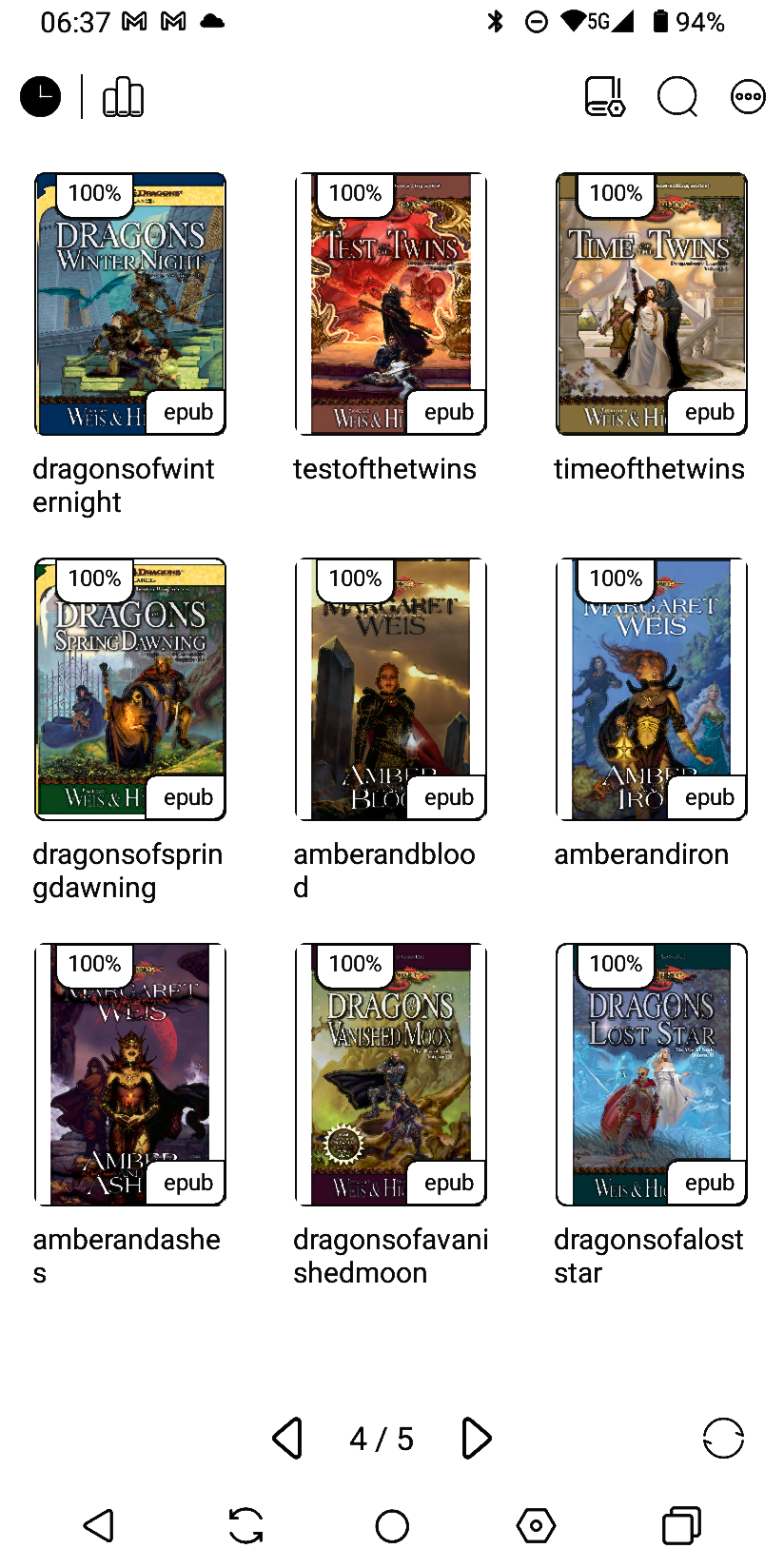
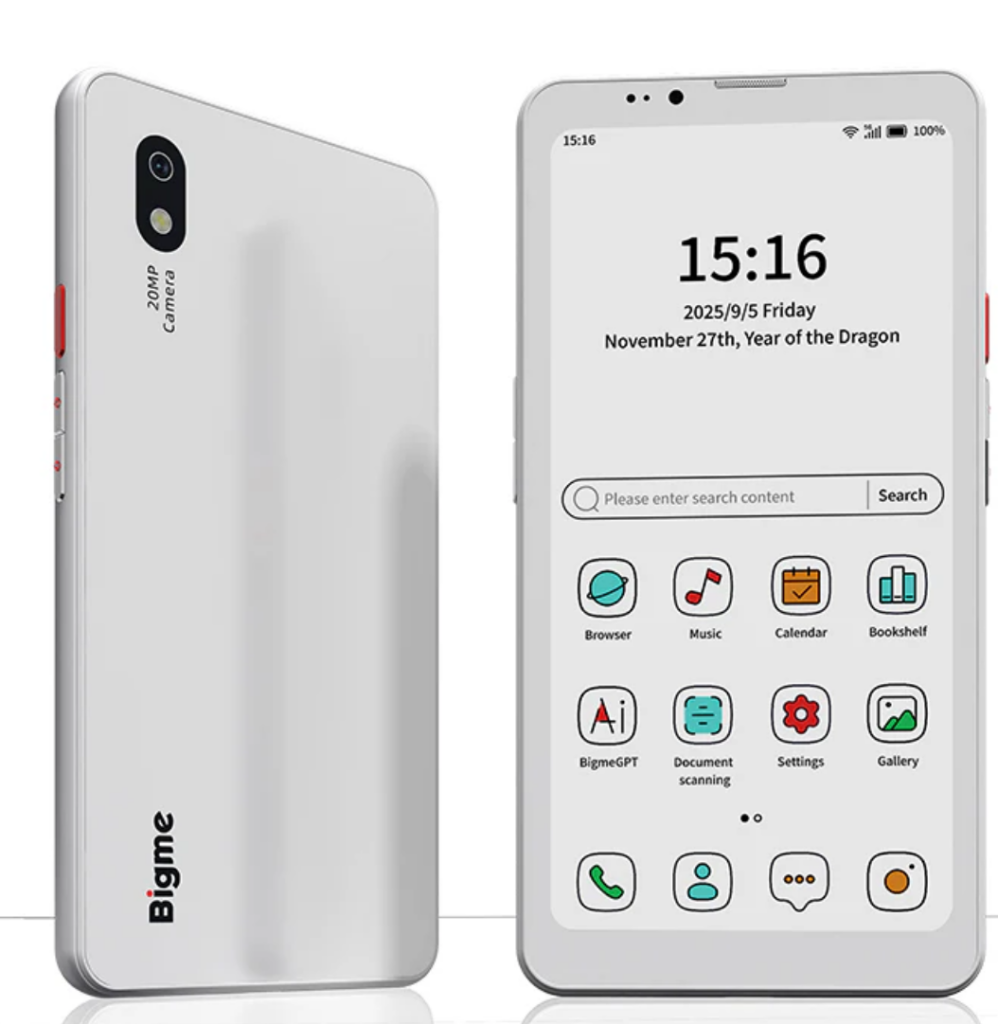
Speaking of reading new books, I’ve reread and finished a couple using new tech. I bought a BIgme HIbreak Pro Color phone back in November and it was delivered on Tuesday December 2nd. Its biggest claim to fame is the color e-ink screen.
My Pixel 4a battery was starting to die, and the phone was definitely showing its age. I’d looked at a bunch of phones, and was leaning towards a lower mid-range Motorola phone, but then I realized that the time I’m spending on my phone is kind of worthless. I doomscroll through instagram and facebook videos a lot, and it’s a waste of my time and brain. That put me out to look at something like the minimal phone or a flip phone jitterbug, but I still needed the apps and RCS messaging.
I have wanted to get an e-ink device with a backlight for quite some time now, as neither my Kindle DX or Entourage Edge devices had backlights. I knew reading on e-ink was a lot nicer, and I figured if I got a phone that did that, then it would double as an ereader. That brought me to looking at Bigme’s offerings. They’ve got a few different options for e-ink phones, but they all didn’t quite meet what I wanted, and then they released the pro version of the Hibreak with a color e-ink screen. I was sold.
I also knew that there would be a good deal of jankiness to the phone. My wife has a Boox e-reader, and the tech troubleshooting I have to do on that is not too bad, but it’s more than most would want to put up with. So, I knew with an eink menu that looked similar to the boox, that it would be janky.
I also knew that the device support would pretty much disappear once I bought it…Reddit has reported as much; but since I’m used to rooting devices and trying different roms on my phones, I wasn’t too worried. So I preordered it.
And it fulfilled my expectations both for the enjoyment of using the screen to read and for the amount of troubleshooting necessary (the notifications was the biggest hiccup). Once that all got settled, it operates like a solid Android phone (nothing fancy there), supports RCS messaging, was easy to set up a Mint sim card on it, and while it can play videos decently, it isn’t something I want to keep open to doom scroll.
It’s a pretty good phone, and if you’re tech-savvy and have patience for dealing with glitches, then I highly recommend it. It isn’t ready for mass use, yet, due to those hiccups…but I’m enjoying it. I’m also getting back into reading…I’ve got about 500 epubs from the last decade or so of buying bundles to get through!